


Everything You Need to Know About Meta’s Link Limits, Meta One Subscriptions, and More.
It’s a tale as old as time for marketers: Your organization has a product launch to promote, an event to showcase, or a story to tell, and social media is where you’ve always shared them before. The only problem? Now, you can’t—thanks to Facebook’s new 2026 link restrictions for organic posts on business pages.
If you’ve tried to post something on your brand’s Facebook page in the last quarter, you may have been met with a new notification that looks like this:
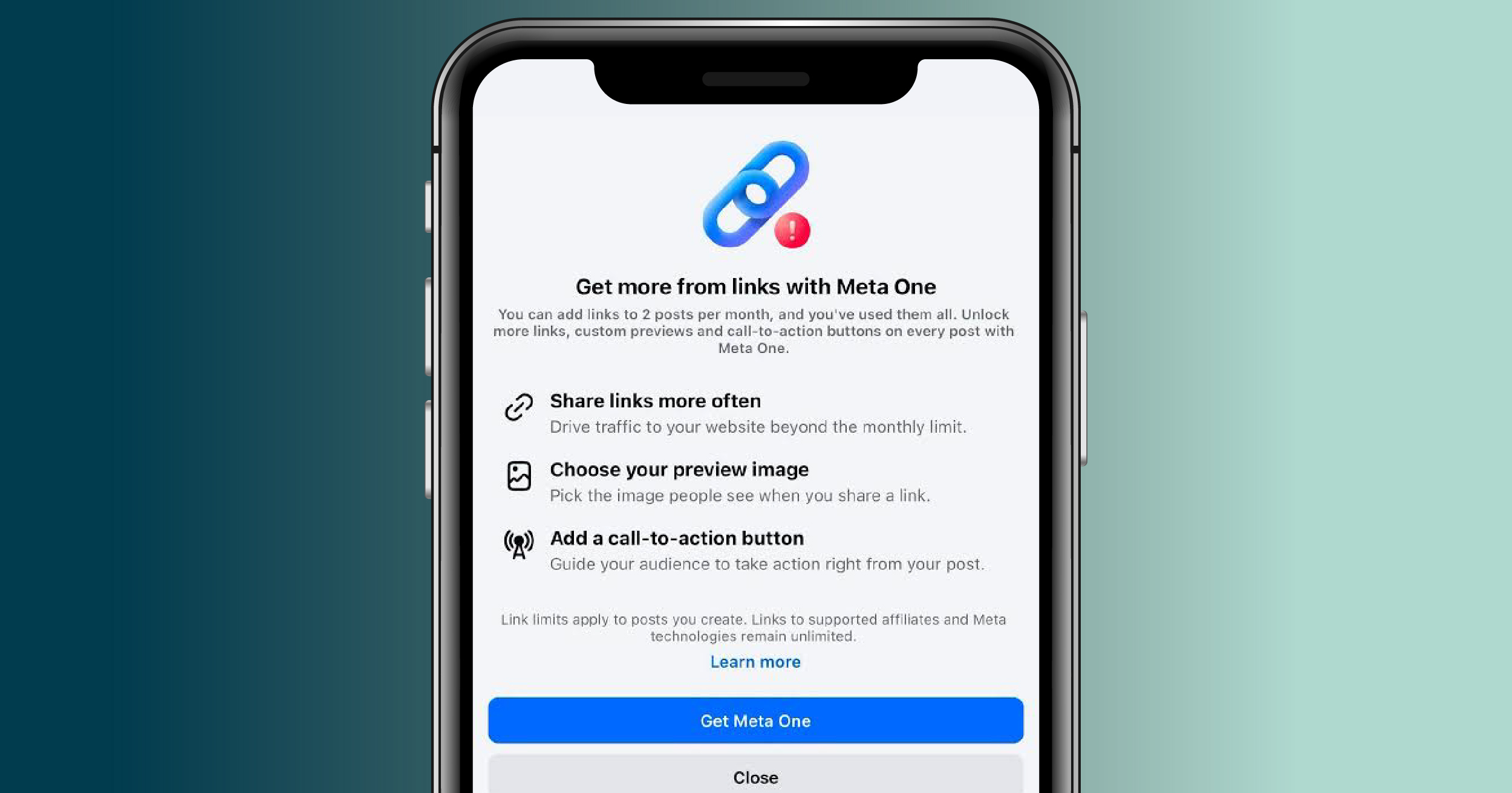
If so, you’re not alone. But this new rollout also poses a new problem for marketers:
How do you drive traffic to your website when you can’t share a link in your post?
Let’s break down everything you need to know about the Facebook’s monthly link limits, Meta One subscriptions, and what your brand needs to know going forward.
LINK LIMITS ARE ROLLING OUT TO FACEBOOK BUSINESS PAGES
While link limits are more widely affecting business accounts since the September 15, 2026 rollout of Meta One subscriptions, social media experts like Mari Smith have cited instances of Facebook restricting links as early as December of 2025.
And even if you haven’t yet been hit with a link limit notification, you may still have noticed a sharp decline in reach for your posts containing links. It’s no secret that Meta wants to keep users on its platforms for longer—the company itself even cited that 98.7% of post views in the U.S. during Q1 in 2026 came from posts that did not include external links. So when posting a link to your event, blog post, or product listing on your website, don’t be surprised if it feels like you’re shouting into the void.
It’s not you—it’s an algorithm fighting to keep users on its platform.
HOW MANY LINKS DO I GET?
If your business page is not subscribed to Meta One, Facebook allows your page to post two links per month. If you want more links, the price is steep, with plans offering more than two links per month starting at $49.99 a month all the way up to $499.99 per month—a price many small businesses can’t afford.
|
Meta One plan |
Links allotted per month on Facebook |
|
Free (no subscription) |
2 |
|
Essential plan (USD $14.99/mo) |
2 |
|
Advanced plan (USD $49.99/mo) |
8 |
|
Expert plan (USD $149.99/mo) |
20 |
|
Max plan (USD $499.99/mo) |
Unlimited |
Prices shown in USD. Prices may vary by region.
While Meta highlights that the majority of Meta One plans also offer brands a way to share links on Instagram, in posts and Reels, as well as other analytics tools and WhatsApp capabilities, it’s up to your team to decide if the cost is worth it for your business.
WHAT COUNTS AS A LINK
Any post that includes a link leading to an external platform that is not Facebook, Instagram, Threads, or WhatsApp counts toward your monthly allotted links. That includes both URLs inserted directly in the body copy of your post, in addition to sharing a link with your business page in the comments of your post.
In the past, marketers were able to work around link limits and limited reach by posting a link in the comments. Now, it appears those links count toward your two-link limit, with your allotted number of links resetting on the first of each month.
WHAT DOESN’T COUNT AS A LINK
According to Facebook, there are four types of links that do not count toward your limit:
-
Additional links in the comments of a post where you've already included a link.
-
Links to Meta technologies, including Facebook, Instagram, WhatsApp and Threads.
-
Links for affiliate partners connected through Facebook's affiliate partnerships.
-
Links in ads.
WHAT TO DO NEXT
These new link limits will undoubtedly affect small businesses, publications, news outlets, and more, but before you jump on a Meta One Subscription (or feel like you have to), consider the following strategies:
-
Create a centralized “hub” for your links: We’ve all seen Instagram accounts use “link in bio” verbiage that points users to a LinkTree, Lnk.Bio, or another “link in bio” URL created by a social media scheduler like Later or Buffer, where all of your posts appear in a grid that you can individually link to external pages. If you don’t already have one for your business’ Instagram page, now is the time to create one and consider linking it in your Facebook profile, as well.
-
Nurture your email subscription lists: We’ve shared why diversifying your strategy across platforms is important for paid content, but the same is true for organic content. More than ever, email marketing is king when it comes to creating touchpoints for your audience to engage with your brand and know where to find you when they’re ready to read, purchase, or browse.
-
Consider moving the conversation to DMs: You may have seen accounts share a caption that says, “Comment RECIPE for the full recipe” or “Comment SHOP for a link to my favorite home items,” where a user can comment to receive a link straight to their DMs from an influencer or business page. Facebook has ways you can automate comments to DMs, but you’ll still want a real person on your team to monitor your inbox if you pursue this method.
-
Ensure your content is designed for social media: Auditing your social media strategy is a must going into 2027 and beyond. Ponder what content your audience resonates with: Is it a carousel post sharing top statistics from your company’s latest research? Or a trendy Reel designed to entertain? Additionally, consider what call-to-action (CTA) makes sense for each post, whether it’s a CTA to follow your brand for similar content, to share that post with others, or leave a comment sharing their own experience. Remember: Your content needs to be strong enough to stand alone on the feed without a link.
-
Allocate your budget for Facebook Ads instead: For organizations still wanting to explore a paid option, consider doing a targeted Facebook Ad campaign rather than a monthly subscription. This way, you can customize your audience reach and share timely campaigns when and how it makes sense for your budget, rather than relying on a subscription.
-
Save your links for your most important promotions: If paid social isn’t in your budget, save those links for when it really matters, like a new product launch or an event you really want eyes on. And don’t forget: you can always share links in your Instagram stories for the other posts without penalty.
WE’RE HERE TO HELP
While Meta One subscriptions are available almost universally across all accounts, the link limit rollout hasn’t hit every business page. As developments continue, Serendipity Media is here to be your experts, so be sure to follow us on social media or subscribe to our monthly enewsletter for more!
If the changing social media landscape has you feeling uncertain, we’re here to help. For over two decades, we’ve helped businesses navigate the latest in social media marketing and budget smarter across the board. Connect with us today to learn how we can help your brand stand out.
Written by Kelsey Hewson, Marketing Specialist at Serendipity Media.